

CosmicDNS
A COSMIC panel applet that switches which DNS servers this device uses — one click between Cloudflare, Google, your Pi-hole, or the router's default — with an automatic DNS cache flush.
About
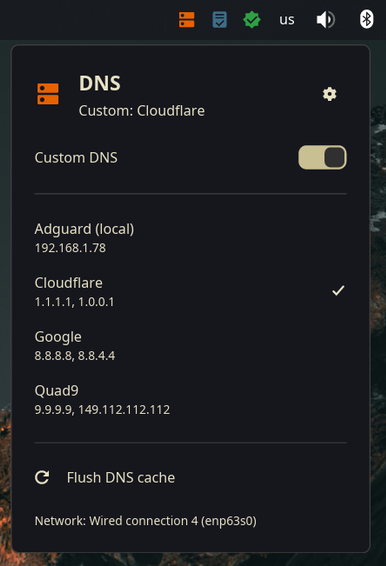
Sometimes you want your ad-blocking Pi-hole; sometimes you need it out of the way. CosmicDNS makes that a panel click: an orange badge when a custom DNS is forced, grey when the router's default is in use, and a popup with your saved servers — seeded with Cloudflare, Google and Quad9, editable and reorderable. Every switch flushes the DNS cache, so the change takes effect immediately.
The override follows your active network: unplug the LAN and join Wi-Fi, and the applet moves your chosen DNS to the new connection and cleans it off the old one, reacting instantly via nmcli monitor. Everything goes through NetworkManager — no daemon, no root, and tunnels/VPNs are deliberately left alone.
Highlights
- State at a glance — orange badge for a custom DNS, grey for the router's default
- One-click switching — saved server list with checkmarked active entry
- Automatic cache flush on every switch, plus flush-on-demand
- Follows the network — the override moves with you between LAN and Wi-Fi, instantly
- No daemon, no root — plain NetworkManager under the hood
- Self-updating from GitHub releases, opt-out in Settings
Install
git clone https://github.com/davidboulay/CosmicDNS.git
cd CosmicDNS && ./install.sh
Prebuilt binaries are on the releases page.
More apps

Clippy
Clipboard history in a strip of tiles

CosmicShot
Capture, annotate, share — CleanShot-style

Solstice Calendar
A fast, native-feeling calendar for Linux

Space Control
Hide the mail spaces you never use

CosmicUpdate
Pending updates, right in the panel

TrueNAS Apps Watcher
Your NAS updates, from the desktop

Home Assistant Watcher
Home Assistant updates, in the panel