

Home Assistant Watcher
Home Assistant updates in your COSMIC panel. Core, OS, add-ons and device firmware, watched from a panel badge and installed with one click.
About
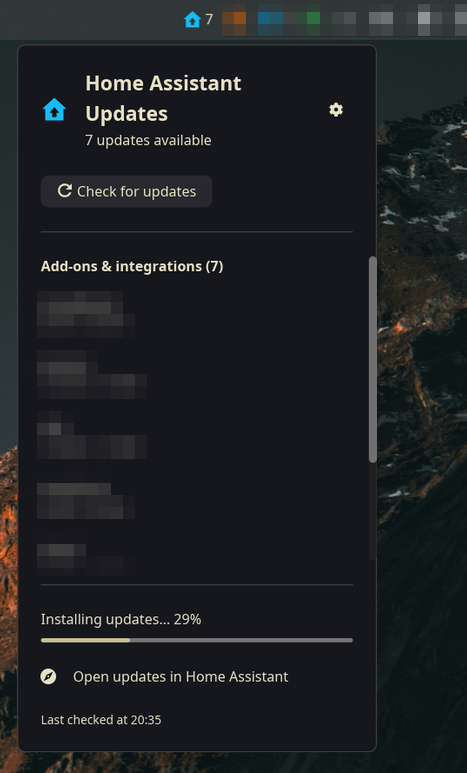
A little house lives in your panel. It stays a muted slate blue while everything in your Home Assistant is current, and turns Home Assistant blue with a count the moment something is published — a Core release, an OS image, an add-on, a Zigbee firmware. Click it and the popup lists what's pending, grouped and versioned.
Everything goes through Home Assistant's REST API with a long-lived access token — no WebSocket, no custom integration to install on the HA side. Pending updates are HA's own update.* entities, and feature bits sort out which are actionable. The hard part is that installing Core or OS restarts the API out from under the call, so the applet watches the service call and the entity together: whichever way the update finishes, the entity flipping off is the signal that survives. It also re-checks every 30 minutes and can keep itself updated from GitHub releases. A sibling of TrueNAS Apps Watcher.
Highlights
- Badge in the panel — only installable updates light it up, so it's always a call to action, never a nag you can't act on
- Grouped popup — Home Assistant (Core, Supervisor, OS), add-ons and integrations, and device firmware, each with its
current → latestversions - Apply all in a safe order — add-ons and firmware first, then Supervisor, Core, OS; it expects the API to vanish mid-update and polls until it returns
- Backup first — optionally asks Home Assistant to snapshot add-ons that support it before updating them, on by default
- Info-only updates can't get stuck — version monitors that can't be installed never reach the badge, and each gets a Dismiss button that mirrors HA's own skip
- Being away is not an error — off the home network it shows a neutral “not reachable — retrying” line and recovers by itself
Install
# Pop!_OS or any COSMIC distro — prebuilt binary, or builds from source
curl -fsSL https://raw.githubusercontent.com/davidboulay/HomeAssistantWatcher/main/install.sh | bash
A .deb is on the releases page too. Then add it from Settings → Desktop → Panel → Add Applet, and point it at your Home Assistant with a long-lived access token.
More apps

Clippy
Clipboard history in a strip of tiles

CosmicShot
Capture, annotate, share — CleanShot-style

Solstice Calendar
A fast, native-feeling calendar for Linux

Space Control
Hide the mail spaces you never use

CosmicUpdate
Pending updates, right in the panel

TrueNAS Apps Watcher
Your NAS updates, from the desktop

CosmicDNS
One-click DNS switching from the panel