

Space Control
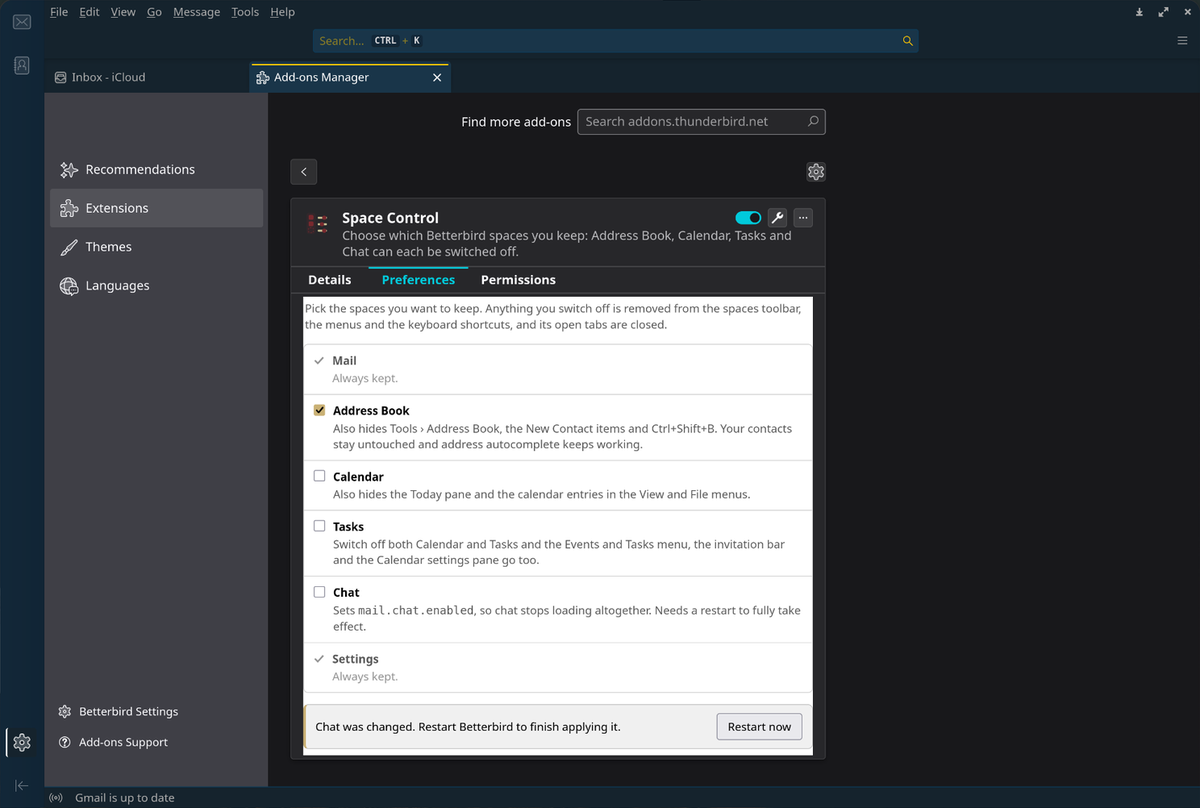
A Betterbird/Thunderbird MailExtension that lets you choose which spaces you keep. Address Book, Calendar, Tasks and Chat can each be switched off; Mail and Settings always stay.
About
Thunderbird's spaces toolbar assumes you want all of it. If you only use it for mail, Calendar, Tasks and Chat still occupy the rail, the menus, the keyboard shortcuts and the invitation bar. Space Control lets you switch each one off — Mail and Settings always stay — and switching one off removes it everywhere, not just from the toolbar.
WebExtension APIs can't touch the main window, so the add-on ships a small chrome-privileged Experiment API: one generated user stylesheet, Thunderbird's own hidden attribute so keyboard focus never lands on an invisible button, the real mail.chat.enabled pref for chat, and a tabmail monitor that closes tabs of switched-off spaces as they open — which is what makes session restore behave.
Highlights
- Pick what you keep — Address Book, Calendar, Tasks and Chat each switch off independently; Mail and Settings always stay
- Hidden everywhere — toolbar, pinned-spaces menu, menu entries, toolbar buttons and keyboard shortcuts, not just the rail
- Survives session restore — a tab monitor closes tabs of switched-off spaces as they come back
- Uses Thunderbird's own mechanisms — the same
hiddenattribute andhide-when-calendar-deactivatedmarker the app uses itself - Fully reversible — disabling or uninstalling restores everything, including the two prefs it sets
- Verified on both ends of the range — Betterbird 140 ESR and Thunderbird 153, with all 45 element references checked against
omni.ja
Install
# Install the .xpi from Releases, then in Thunderbird:
# Add-ons and Themes → gear menu → Install Add-on From File

# Or build it yourself:
git clone https://github.com/davidboulay/thunderbird-space-control.git
cd thunderbird-space-control && ./build.sh
Then open Tools → Space Control… and pick your spaces — nothing is hidden until you switch something off. Thunderbird doesn't require add-ons to be signed, so installing the .xpi straight from Releases is supported rather than a workaround.
More apps

Clippy
Clipboard history in a strip of tiles

CosmicShot
Capture, annotate, share — CleanShot-style

Solstice Calendar
A fast, native-feeling calendar for Linux

CosmicUpdate
Pending updates, right in the panel

TrueNAS Apps Watcher
Your NAS updates, from the desktop

Home Assistant Watcher
Home Assistant updates, in the panel

CosmicDNS
One-click DNS switching from the panel