

TrueNAS Apps Watcher
Keep an eye on your TrueNAS SCALE apps from the desktop: a COSMIC panel applet and a macOS menu-bar app that watch for pending Docker updates and apply them without opening a browser.
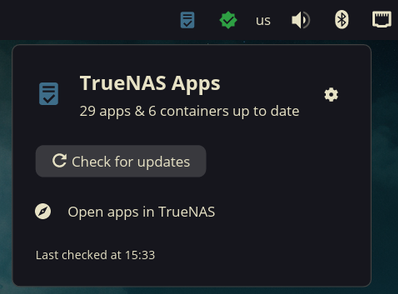
About
If you run a homelab, app updates pile up quietly until you next open the TrueNAS web UI. This app watches the server for you: a NAS-shaped badge in TrueNAS blue shows the number of pending updates, and the popup splits them into catalog version bumps, newer Docker image builds, and — optionally — containers you run outside TrueNAS's apps, checked through Portainer the same way Watchtower does.
“Apply N updates” runs everything server-side, one item at a time with live progress: catalog upgrades through TrueNAS's own job API, image pulls with per-layer progress, and Portainer containers recreated just like its Recreate button. A failure on one item doesn't stop the rest.
Highlights
- Two native clients — a COSMIC panel applet and a macOS menu-bar app with no Dock icon
- Three update sources — TrueNAS catalog bumps, newer image digests, and Portainer-managed containers
- Apply from the popup — server-side upgrades with live per-item progress
- Registry checks — Docker Hub, ghcr.io, lscr.io and other standard registries, anonymously
- Re-checks every 30 minutes, and on demand with a catalog re-sync
Install
git clone https://github.com/davidboulay/TruenasAppsWatcher.git
cd TruenasAppsWatcher && ./install.sh
Prebuilt binaries and the macOS app are on the releases page.
More apps

Clippy
Clipboard history in a strip of tiles

CosmicShot
Capture, annotate, share — CleanShot-style

Solstice Calendar
A fast, native-feeling calendar for Linux

Space Control
Hide the mail spaces you never use

CosmicUpdate
Pending updates, right in the panel

Home Assistant Watcher
Home Assistant updates, in the panel

CosmicDNS
One-click DNS switching from the panel