
VPN Switcher
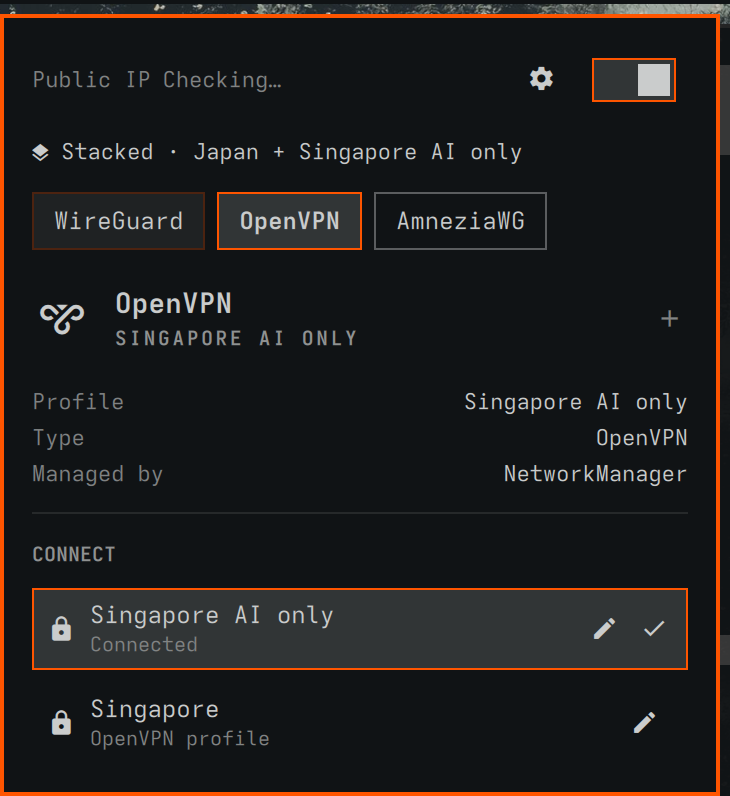
One bar icon for every VPN on an Omarchy machine. It shows whether you're behind a tunnel, and one panel connects, disconnects, stacks and switches between the VPN tools you actually have installed.
About
Every VPN ships its own CLI, its own tray app, its own idea of “connected”. On a Hyprland desktop that usually means a terminal tab per provider. VPN Switcher puts them all behind one icon in the Omarchy bar — dim when nothing is up, bright when a tunnel is — and a keyboard-driven panel with a chip per installed tool: Proton VPN, Mullvad, Windscribe, Cloudflare WARP, AmneziaWG, and the OpenVPN, WireGuard, OpenConnect, VPNC and L2TP/IPsec profiles NetworkManager holds. Only the tools you actually have show up.
Each backend drives the tool's own CLI — protonvpn, mullvad, windscribe-cli, warp-cli, awg-quick, nmcli — and reads its state back on every poll, so nothing drifts from what the tool reports. By default connecting one VPN shuts the others down first; flip stacking on and tunnels from different tools stay up together, say an office network next to a full tunnel. It started from jkoestinger/omarchy-vpn and adds stacking, profile import, exit location, AmneziaWG under systemd and profile editing.
Highlights
- Every tool, one panel — Proton, Mullvad, Windscribe, WARP, AmneziaWG and NetworkManager tunnels, each on its own chip
- Stack or switch — one tunnel at a time by default, or several from different tools side by side
- Import a profile —
.ovpnand WireGuard/AmneziaWG.conffiles from a picker, imported with autoconnect off - Exit location — public IP plus city and country, in the panel and the bar tooltip
- Keyboard-first —
j/k,/to search countries,eto edit a profile,dto disconnect - Scriptable —
omarchy-shell davidboulay.vpn-switcher connect CHand friends, for keybindings
Install
$ omarchy plugin add https://github.com/davidboulay/omarchy-vpn-switcher.git
$ omarchy plugin enable davidboulay.vpn-switcher
Or Setup › Plugins from the Omarchy menu. The icon lands at the right end of the bar; move it with omarchy bar move.
More apps
 omarchy
Maintainer Inbox
Issues and PRs waiting on you, in the bar
omarchyMulti-Monitor Workspaces
Workspaces 1–9 on every monitor
omarchyScreensaver Lock
Dismiss the screensaver, get the lock screen
omarchyWi-Fi Login Popup
Hotel and airport Wi-Fi sign-in, automatically
 omarchy
TrueNAS Apps Watcher for Omarchy
TrueNAS app updates in the Omarchy bar
 omarchy
Home Assistant Watcher for Omarchy
Home Assistant updates in the Omarchy bar
 more
more
Clippy
Clipboard history in a strip of tiles
 cosmic
CosmicShot
Capture, annotate, share — CleanShot-style
 more
more
Space Control
Hide the mail spaces you never use
 cosmic
CosmicUpdate
Pending updates, right in the panel
 cosmic
TrueNAS Apps Watcher
Your NAS updates, from the desktop
 cosmic
Home Assistant Watcher
Home Assistant updates, in the panel
 cosmic
CosmicDNS
One-click DNS switching from the panel
 more
more
OpenKraken
NZXT Kraken control for Linux
 more
more
Lightspeed X-Series MCP
Ask Claude about your Lightspeed stores